Nahtlose CKEditor 5 Integration in Nuxt3:
Eine Schritt-für-Schritt-Anleitung

by
Andrey Kalashnikov
Senior Python Entwickler
Lesezeit
13
Minuten
veröffentlicht
teilen



Dieser Artikel bietet ein detailliertes Beispiel für die Integration des CKEditor 5 in ein Nuxt.js 3-Projekt. Warum entstand die Idee für diesen Artikel? Das in Entwicklung befindliche Projekt nutzt einen Stack von Vue3 + Nuxt.js 3 + PrimeVue. PrimeVue hat bereits einen integrierten Editor, aber er basiert auf Quill. Dieser Editor ist gut für einen schnellen Start, aber das Projekt erforderte: das Speichern des eingegebenen Inhalts als HTML (Quill verwendet sein eigenes Delta-Format), da der Inhalt später in einer Flutter-Webanwendung gerendert werden musste. Es war notwendig, eine minimale Kompatibilität mit dem vorherigen Projekt sicherzustellen, von dem die Migration stattfand, in dem CKEditor 4 verwendet wurde.
Projektstart
Das Projekt wird Node v20.11.0 und npm-Version 10.2.4 verwenden
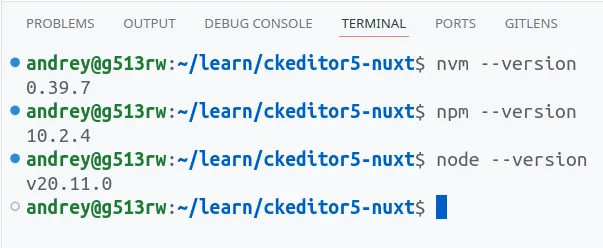
Wir werden die Beispielentwicklung in einem sauberen Projekt durchführen, das mit dem Initialisierungsbefehl gemäß der offiziellen Nuxt-Dokumentation erstellt wurde.
npx nuxi@latest init ckeditor5-nuxt
npx nuxi@latest init ckeditor5-nuxt
npx nuxi@latest init ckeditor5-nuxt
npx nuxi@latest init ckeditor5-nuxt
Jetzt müssen wir den Kernteil des Editors installieren. Wichtig! Zuerst ist es notwendig, die verfügbaren Versionen für die Pakete zu überprüfen. Alle Pakete für den Editor (Plugins und Erweiterungen) sollten mit derselben Version installiert werden.
npm view @ckeditor/ckeditor5-core versions
npm view @ckeditor/ckeditor5-core versions
npm view @ckeditor/ckeditor5-core versions
npm view @ckeditor/ckeditor5-core versions
Wir wählen die letzte stabile Version aus den verfügbaren Optionen. In diesem Fall wird es `43.0.0` sein.
npm i @ckeditor/ckeditor5-vue@6.0.0 @ckeditor/ckeditor5-build-classic@43.0.0
npm i @ckeditor/ckeditor5-vue@6.0.0 @ckeditor/ckeditor5-build-classic@43.0.0
npm i @ckeditor/ckeditor5-vue@6.0.0 @ckeditor/ckeditor5-build-classic@43.0.0
npm i @ckeditor/ckeditor5-vue@6.0.0 @ckeditor/ckeditor5-build-classic@43.0.0
Wo:
`@ckeditor/ckeditor5-vue@6.0.0` ist die Komponente zur Integration des Editors
`@ckeditor/ckeditor5-build-classic@43.0.0` ist der Kern-Build des Editors.
Nach der Installation der Paketversionen müssen diese eingefroren werden. Die endgültige `package.json` wird ungefähr so aussehen:
{ "name": "nuxt-app", "private": true, "type": "module", "scripts": { "build": "nuxt build", "dev": "nuxt dev", "generate": "nuxt generate", "preview": "nuxt preview", "postinstall": "nuxt prepare" }, "dependencies": { "@ckeditor/ckeditor5-build-classic": "43.0.0", "@ckeditor/ckeditor5-vue": "6.0.0", "nuxt": "^3.12.4", "vue": "latest" }}
{ "name": "nuxt-app", "private": true, "type": "module", "scripts": { "build": "nuxt build", "dev": "nuxt dev", "generate": "nuxt generate", "preview": "nuxt preview", "postinstall": "nuxt prepare" }, "dependencies": { "@ckeditor/ckeditor5-build-classic": "43.0.0", "@ckeditor/ckeditor5-vue": "6.0.0", "nuxt": "^3.12.4", "vue": "latest" }}
{ "name": "nuxt-app", "private": true, "type": "module", "scripts": { "build": "nuxt build", "dev": "nuxt dev", "generate": "nuxt generate", "preview": "nuxt preview", "postinstall": "nuxt prepare" }, "dependencies": { "@ckeditor/ckeditor5-build-classic": "43.0.0", "@ckeditor/ckeditor5-vue": "6.0.0", "nuxt": "^3.12.4", "vue": "latest" }}
{ "name": "nuxt-app", "private": true, "type": "module", "scripts": { "build": "nuxt build", "dev": "nuxt dev", "generate": "nuxt generate", "preview": "nuxt preview", "postinstall": "nuxt prepare" }, "dependencies": { "@ckeditor/ckeditor5-build-classic": "43.0.0", "@ckeditor/ckeditor5-vue": "6.0.0", "nuxt": "^3.12.4", "vue": "latest" }}
Als nächstes lassen Sie uns eine Seite erstellen, die als Hauptseite für unser Beispiel dient, auf der wir später den Editor platzieren werden:
rm ./app.vue; mkdir pages; touch ./pages/index.vue
rm ./app.vue; mkdir pages; touch ./pages/index.vue
rm ./app.vue; mkdir pages; touch ./pages/index.vue
rm ./app.vue; mkdir pages; touch ./pages/index.vue
Wir werden die Seite `pages/index.vue` mit dem einfachsten Inhalt füllen:
<template> <h1>Greetings!</h1> <p>Hello world!</p></template><script setup></script
<template> <h1>Greetings!</h1> <p>Hello world!</p></template><script setup></script
<template> <h1>Greetings!</h1> <p>Hello world!</p></template><script setup></script
<template> <h1>Greetings!</h1> <p>Hello world!</p></template><script setup></script
Überprüfen Sie die Funktionalität, indem Sie den Server starten:
npm run dev
npm run dev
npm run dev
npm run dev
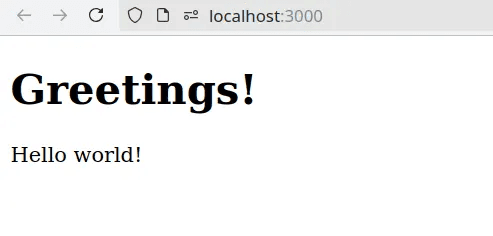
Lassen Sie uns eine Komponente erstellen, die den integrierten Editor umschließt:
mkdir ./components; touch ./components/rich-editor.vue
mkdir ./components; touch ./components/rich-editor.vue
mkdir ./components; touch ./components/rich-editor.vue
mkdir ./components; touch ./components/rich-editor.vue
Wir füllen die Komponente `components/rich-editor.vue` mit einer Platzhalter-Vorlage:
<template> <div>rich_text_editor_plug</div></template
<template> <div>rich_text_editor_plug</div></template
<template> <div>rich_text_editor_plug</div></template
<template> <div>rich_text_editor_plug</div></template
Und dann werden wir die Komponente mit der Hauptvorlage in pages/index.vue verbinden:
<template> <h1>CKEditor 5 in Nuxt.js 3 project</h1> <p> <rich-editor /> </p></template><script setup></script
<template> <h1>CKEditor 5 in Nuxt.js 3 project</h1> <p> <rich-editor /> </p></template><script setup></script
<template> <h1>CKEditor 5 in Nuxt.js 3 project</h1> <p> <rich-editor /> </p></template><script setup></script
<template> <h1>CKEditor 5 in Nuxt.js 3 project</h1> <p> <rich-editor /> </p></template><script setup></script
CKEditor verbinden
Um den Editor zu verbinden, müssen wir:
Eine erste Editor-Konfiguration erstellen oder einen vorhandenen Build verwenden. In unserem Fall werden wir mit einem Basis-Build beginnen, den wir später durch unseren eigenen benutzerdefinierten Build ersetzen werden.
Ein Plugin für das Nuxt.js-Projekt erstellen und verbinden.
Die erstellte Editor-Konfiguration zur Komponente hinzufügen, die den Editor umschließt.
CKEditor 5 wird als Plugin in das Projekt integriert. Daher müssen wir zuerst dieses Plugin erstellen:
mkdir plugins; touch plugins/ckeditor.ts
mkdir plugins; touch plugins/ckeditor.ts
mkdir plugins; touch plugins/ckeditor.ts
mkdir plugins; touch plugins/ckeditor.ts
Lassen Sie uns die Plugin-Konfiguration in `plugins/ckeditor.ts` erstellen:
import CKEditor from "@ckeditor/ckeditor5-vue";import ClassicEditor from "@ckeditor/ckeditor5-build-classic";export default defineNuxtPlugin((nuxtApp) => { nuxtApp.vueApp.use(CKEditor); return { provide: { ckeditor: { classicEditor: ClassicEditor, }, }, };});
import CKEditor from "@ckeditor/ckeditor5-vue";import ClassicEditor from "@ckeditor/ckeditor5-build-classic";export default defineNuxtPlugin((nuxtApp) => { nuxtApp.vueApp.use(CKEditor); return { provide: { ckeditor: { classicEditor: ClassicEditor, }, }, };});
import CKEditor from "@ckeditor/ckeditor5-vue";import ClassicEditor from "@ckeditor/ckeditor5-build-classic";export default defineNuxtPlugin((nuxtApp) => { nuxtApp.vueApp.use(CKEditor); return { provide: { ckeditor: { classicEditor: ClassicEditor, }, }, };});
import CKEditor from "@ckeditor/ckeditor5-vue";import ClassicEditor from "@ckeditor/ckeditor5-build-classic";export default defineNuxtPlugin((nuxtApp) => { nuxtApp.vueApp.use(CKEditor); return { provide: { ckeditor: { classicEditor: ClassicEditor, }, }, };});
Um das Plugin zu verbinden, müssen wir die Konfigurationsdatei des Projekts `nuxt.config.ts` bearbeiten:
// https://nuxt.com/docs/api/configuration/nuxt-configexport default defineNuxtConfig({ devtools: { enabled: true }, vite: { plugins: [ '~/plugins/ckeditor.ts' ], }, ssr: false, compatibilityDate: '2024-08-07',});
// https://nuxt.com/docs/api/configuration/nuxt-configexport default defineNuxtConfig({ devtools: { enabled: true }, vite: { plugins: [ '~/plugins/ckeditor.ts' ], }, ssr: false, compatibilityDate: '2024-08-07',});
// https://nuxt.com/docs/api/configuration/nuxt-configexport default defineNuxtConfig({ devtools: { enabled: true }, vite: { plugins: [ '~/plugins/ckeditor.ts' ], }, ssr: false, compatibilityDate: '2024-08-07',});
// https://nuxt.com/docs/api/configuration/nuxt-configexport default defineNuxtConfig({ devtools: { enabled: true }, vite: { plugins: [ '~/plugins/ckeditor.ts' ], }, ssr: false, compatibilityDate: '2024-08-07',});
Es ist wichtig zu beachten, dass in der aktuellen Projektkonfiguration die Option ssr: false verwendet wird, was bedeutet, dass es nicht notwendig ist, anzugeben, in welchen Komponenten sie gerendert werden sollen (Client oder Server).
Jetzt lassen Sie uns den aktuellen Editor-Build zur vorher vorbereiteten Komponente components/rich-editor.vue hinzufügen:
<template> <ckeditor :editor="editor" /></template><script setup>const { $ckeditor } = useNuxtApp();const editor = $ckeditor.classicEditor;</script
<template> <ckeditor :editor="editor" /></template><script setup>const { $ckeditor } = useNuxtApp();const editor = $ckeditor.classicEditor;</script
<template> <ckeditor :editor="editor" /></template><script setup>const { $ckeditor } = useNuxtApp();const editor = $ckeditor.classicEditor;</script
<template> <ckeditor :editor="editor" /></template><script setup>const { $ckeditor } = useNuxtApp();const editor = $ckeditor.classicEditor;</script
Lassen Sie uns den Server starten und überprüfen:
npm run dev
npm run dev
npm run dev
npm run dev
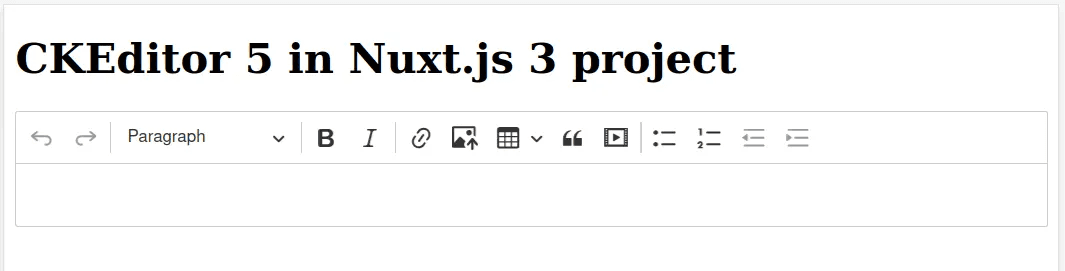
Der Editor ist einsatzbereit. Wenn die grundlegende Funktionalität für Sie ausreicht, können Sie hier aufhören.
Hinweise: Bei der Installation neuer Versionen des Editors sollten Sie die Version des ckeditor5-vue-Pakets nicht sofort erhöhen, da möglicherweise keine Unterstützung für die neuesten Versionen des Editors hinzugefügt wird. Wenn es nicht mit der neuesten stabilen Version funktioniert, versuchen Sie, auf eine niedrigere Hauptversion des Pakets zurückzurollen (z. B. 7.0.0 → 6.0.0)
CKEditor-Konfiguration
Wir haben nur den grundlegenden Editor-Build verbunden, aber was ist, wenn Sie die erforderliche Funktionalität konfigurieren müssen? Dazu können Sie eine zusätzliche Konfiguration oder mehr als eine erstellen.
Informationen zu allen möglichen pluggable Funktionen finden Sie im entsprechenden Abschnitt der Editor-Dokumentation.
Um eine neue Konfiguration für den Editor zu erstellen, verwenden wir die Datei `utils/custom-editor.ts`:
mkdir utils; touch utils/custom-editor.ts
mkdir utils; touch utils/custom-editor.ts
mkdir utils; touch utils/custom-editor.ts
mkdir utils; touch utils/custom-editor.ts
Der Standort der Konfigurationsdatei ist nicht streng definiert, sie kann in einem für Sie bequemen Verzeichnis gemäß dem im Projekt integrierten Arbeitsablauf abgelegt werden.
Als nächstes müssen Sie die entsprechenden Plugins installieren, die für die gewünschte Funktionalität verantwortlich sind. Wie bereits erwähnt, müssen Plugins gemäß der Version des verwendeten Editors ausgewählt werden. In diesem Artikel wird die Version `43.0.0` betrachtet. Wie stellt man fest, was installiert werden muss? Zum Beispiel nehmen wir die Funktion zum Einfügen von Zitaten. Der relevante Dokumentationsartikel beschreibt die Funktionsweise und Verbindung des Plugins, und der Name des Plugins muss im Projektrepository gefunden werden:
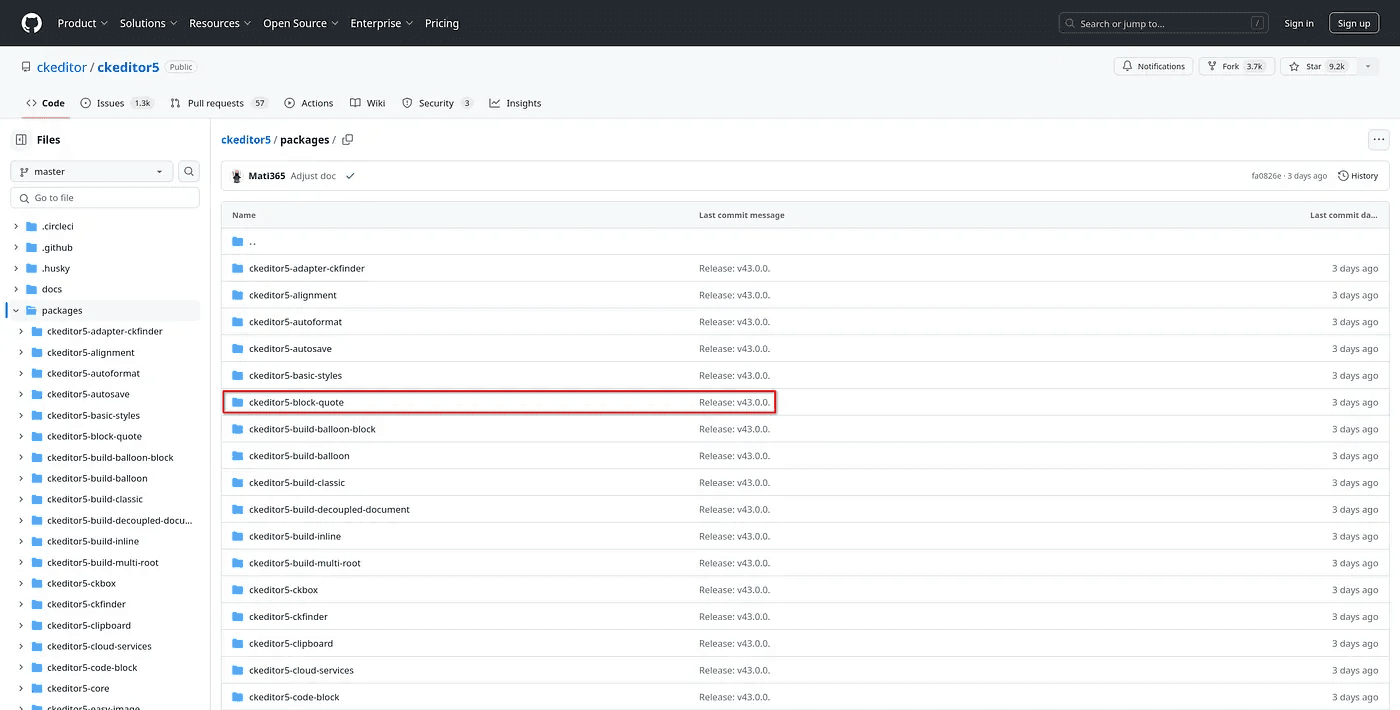
Lassen Sie uns das Plugin und mehrere zusätzliche Pakete installieren, die wir für die Erstellung unserer eigenen Konfiguration benötigen:
npm i @ckeditor/ckeditor5-core@43.0.0 \ @ckeditor/ckeditor5-essentials@43.0.0 \ @ckeditor/ckeditor5-block-quote@43.0.0 \ @ckeditor/ckeditor5-paragraph@43.0.0; \ npm uninstall @ckeditor/ckeditor5-build-classic
npm i @ckeditor/ckeditor5-core@43.0.0 \ @ckeditor/ckeditor5-essentials@43.0.0 \ @ckeditor/ckeditor5-block-quote@43.0.0 \ @ckeditor/ckeditor5-paragraph@43.0.0; \ npm uninstall @ckeditor/ckeditor5-build-classic
npm i @ckeditor/ckeditor5-core@43.0.0 \ @ckeditor/ckeditor5-essentials@43.0.0 \ @ckeditor/ckeditor5-block-quote@43.0.0 \ @ckeditor/ckeditor5-paragraph@43.0.0; \ npm uninstall @ckeditor/ckeditor5-build-classic
npm i @ckeditor/ckeditor5-core@43.0.0 \ @ckeditor/ckeditor5-essentials@43.0.0 \ @ckeditor/ckeditor5-block-quote@43.0.0 \ @ckeditor/ckeditor5-paragraph@43.0.0; \ npm uninstall @ckeditor/ckeditor5-build-classic
Wo:
`@ckeditor/ckeditor5-core@43.0.0` zur Verwendung von Typen in der Konfiguration
`@ckeditor/ckeditor5-essentials@43.0.0` ein Satz minimaler Funktionen für die Funktion des Editors
`@ckeditor/ckeditor5-block-quote@43.0.0` ein Plugin zum Verbinden von Zitaten
`@ckeditor/ckeditor5-paragraph@43.0.0` ein Plugin für die Möglichkeit, Absätze im Editor zu erstellen. Wichtig! Ohne dieses Plugin können Sie keinen Text im Editorfeld eingeben.
Ein separater Befehl entfernt den `@ckeditor/ckeditor5-build-classic`-Build, da wir unsere eigene Konfiguration einrichten
Datei `package.json` nach der Installation:
{ "name": "nuxt-app", "private": true, "type": "module", "scripts": { "build": "nuxt build", "dev": "nuxt dev", "generate": "nuxt generate", "preview": "nuxt preview", "postinstall": "nuxt prepare" }, "dependencies": { "@ckeditor/ckeditor5-block-quote": "43.0.0", "@ckeditor/ckeditor5-core": "43.0.0", "@ckeditor/ckeditor5-essentials": "43.0.0", "@ckeditor/ckeditor5-paragraph": "43.0.0", "@ckeditor/ckeditor5-vue": "6.0.0", "nuxt": "^3.12.4", "vue": "latest" }}
{ "name": "nuxt-app", "private": true, "type": "module", "scripts": { "build": "nuxt build", "dev": "nuxt dev", "generate": "nuxt generate", "preview": "nuxt preview", "postinstall": "nuxt prepare" }, "dependencies": { "@ckeditor/ckeditor5-block-quote": "43.0.0", "@ckeditor/ckeditor5-core": "43.0.0", "@ckeditor/ckeditor5-essentials": "43.0.0", "@ckeditor/ckeditor5-paragraph": "43.0.0", "@ckeditor/ckeditor5-vue": "6.0.0", "nuxt": "^3.12.4", "vue": "latest" }}
{ "name": "nuxt-app", "private": true, "type": "module", "scripts": { "build": "nuxt build", "dev": "nuxt dev", "generate": "nuxt generate", "preview": "nuxt preview", "postinstall": "nuxt prepare" }, "dependencies": { "@ckeditor/ckeditor5-block-quote": "43.0.0", "@ckeditor/ckeditor5-core": "43.0.0", "@ckeditor/ckeditor5-essentials": "43.0.0", "@ckeditor/ckeditor5-paragraph": "43.0.0", "@ckeditor/ckeditor5-vue": "6.0.0", "nuxt": "^3.12.4", "vue": "latest" }}
{ "name": "nuxt-app", "private": true, "type": "module", "scripts": { "build": "nuxt build", "dev": "nuxt dev", "generate": "nuxt generate", "preview": "nuxt preview", "postinstall": "nuxt prepare" }, "dependencies": { "@ckeditor/ckeditor5-block-quote": "43.0.0", "@ckeditor/ckeditor5-core": "43.0.0", "@ckeditor/ckeditor5-essentials": "43.0.0", "@ckeditor/ckeditor5-paragraph": "43.0.0", "@ckeditor/ckeditor5-vue": "6.0.0", "nuxt": "^3.12.4", "vue": "latest" }}
Fügen Sie die Konfiguration und das installierte Plugin zur Datei `utils/custom-editor.ts` hinzu:
import { ClassicEditor, BlockQuote, Essentials, Paragraph } from 'ckeditor5';import type { EditorConfig } from '@ckeditor/ckeditor5-core';// You can read more about extending the build with additional plugins in the "Installing plugins" guide.// See https://ckeditor.com/docs/ckeditor5/latest/installation/plugins/installing-plugins.html for details.import 'ckeditor5/ckeditor5.css';class Editor extends ClassicEditor { public static override builtinPlugins = [ Essentials, BlockQuote, Paragraph ]; public static override defaultConfig: EditorConfig = { toolbar: { items: [ 'undo', 'redo', '|','blockQuote' ] } };}export default Editor;
import { ClassicEditor, BlockQuote, Essentials, Paragraph } from 'ckeditor5';import type { EditorConfig } from '@ckeditor/ckeditor5-core';// You can read more about extending the build with additional plugins in the "Installing plugins" guide.// See https://ckeditor.com/docs/ckeditor5/latest/installation/plugins/installing-plugins.html for details.import 'ckeditor5/ckeditor5.css';class Editor extends ClassicEditor { public static override builtinPlugins = [ Essentials, BlockQuote, Paragraph ]; public static override defaultConfig: EditorConfig = { toolbar: { items: [ 'undo', 'redo', '|','blockQuote' ] } };}export default Editor;
import { ClassicEditor, BlockQuote, Essentials, Paragraph } from 'ckeditor5';import type { EditorConfig } from '@ckeditor/ckeditor5-core';// You can read more about extending the build with additional plugins in the "Installing plugins" guide.// See https://ckeditor.com/docs/ckeditor5/latest/installation/plugins/installing-plugins.html for details.import 'ckeditor5/ckeditor5.css';class Editor extends ClassicEditor { public static override builtinPlugins = [ Essentials, BlockQuote, Paragraph ]; public static override defaultConfig: EditorConfig = { toolbar: { items: [ 'undo', 'redo', '|','blockQuote' ] } };}export default Editor;
import { ClassicEditor, BlockQuote, Essentials, Paragraph } from 'ckeditor5';import type { EditorConfig } from '@ckeditor/ckeditor5-core';// You can read more about extending the build with additional plugins in the "Installing plugins" guide.// See https://ckeditor.com/docs/ckeditor5/latest/installation/plugins/installing-plugins.html for details.import 'ckeditor5/ckeditor5.css';class Editor extends ClassicEditor { public static override builtinPlugins = [ Essentials, BlockQuote, Paragraph ]; public static override defaultConfig: EditorConfig = { toolbar: { items: [ 'undo', 'redo', '|','blockQuote' ] } };}export default Editor;
Es ist wichtig zu beachten, dass Folgendes in der Konfiguration zu berücksichtigen ist:
Sie müssen Stile aus `ckeditor5.css` einfügen
Plugins werden aus dem `ckeditor5`-Paket importiert, und diese Methode der Einfügung ist seit der Version `42.0.0` im Editor verfügbar. Davor wurde eine andere Methode zum direkten Import von Plugins aus installierten Paketen verwendet. Alte Methoden der Einfügung finden Sie in den entsprechenden Abschnitten der Dokumentation
Sie müssen `toolbar` in der Konfiguration beschreiben, da sie die Benutzeroberfläche des Editors beschreibt
Fügen Sie als Nächstes eine neue Konfiguration zur Plugin-Konfigurationsdatei `plugins/ckeditor.ts` hinzu:
import Ckeditor from "@ckeditor/ckeditor5-vue";// import ClassicEditor from "@ckeditor/ckeditor5-build-classic";import Editor from "~/utils/custom-editor";export default defineNuxtPlugin((nuxtApp) => { nuxtApp.vueApp.use(Ckeditor); return { provide: { ckeditor: { // classicEditor: ClassicEditor, customEditor: Editor, }, }, };});
import Ckeditor from "@ckeditor/ckeditor5-vue";// import ClassicEditor from "@ckeditor/ckeditor5-build-classic";import Editor from "~/utils/custom-editor";export default defineNuxtPlugin((nuxtApp) => { nuxtApp.vueApp.use(Ckeditor); return { provide: { ckeditor: { // classicEditor: ClassicEditor, customEditor: Editor, }, }, };});
import Ckeditor from "@ckeditor/ckeditor5-vue";// import ClassicEditor from "@ckeditor/ckeditor5-build-classic";import Editor from "~/utils/custom-editor";export default defineNuxtPlugin((nuxtApp) => { nuxtApp.vueApp.use(Ckeditor); return { provide: { ckeditor: { // classicEditor: ClassicEditor, customEditor: Editor, }, }, };});
import Ckeditor from "@ckeditor/ckeditor5-vue";// import ClassicEditor from "@ckeditor/ckeditor5-build-classic";import Editor from "~/utils/custom-editor";export default defineNuxtPlugin((nuxtApp) => { nuxtApp.vueApp.use(Ckeditor); return { provide: { ckeditor: { // classicEditor: ClassicEditor, customEditor: Editor, }, }, };});
In der Wrapper-Komponente `components/rich-editor.vue` müssen Sie die Verwendung der neuen Konfiguration angeben:
<template> <ckeditor :editor="customEditor" /></template><script setup>const { $ckeditor } = useNuxtApp();// const classicEditor = $ckeditor.classicEditor;const customEditor = $ckeditor.customEditor;</script
<template> <ckeditor :editor="customEditor" /></template><script setup>const { $ckeditor } = useNuxtApp();// const classicEditor = $ckeditor.classicEditor;const customEditor = $ckeditor.customEditor;</script
<template> <ckeditor :editor="customEditor" /></template><script setup>const { $ckeditor } = useNuxtApp();// const classicEditor = $ckeditor.classicEditor;const customEditor = $ckeditor.customEditor;</script
<template> <ckeditor :editor="customEditor" /></template><script setup>const { $ckeditor } = useNuxtApp();// const classicEditor = $ckeditor.classicEditor;const customEditor = $ckeditor.customEditor;</script
Lassen Sie uns starten und die Funktionsweise des Editors überprüfen:
npm run dev
npm run dev
npm run dev
npm run dev
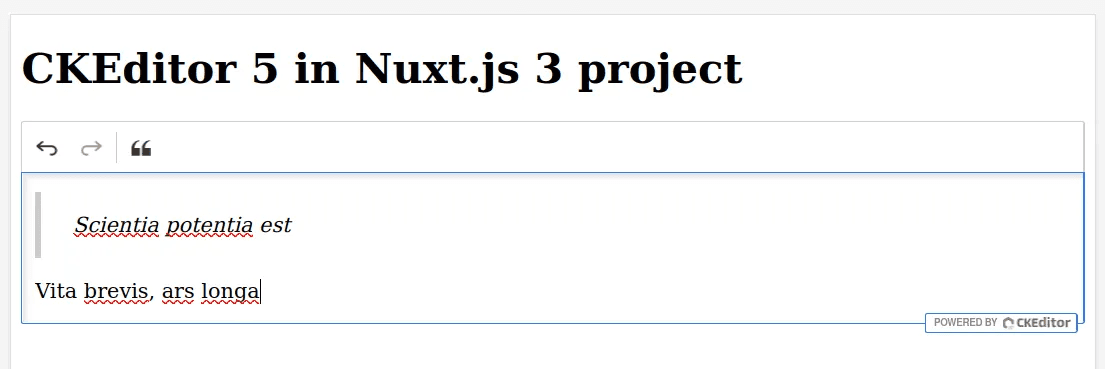
Somit ist es notwendig, um die gewünschte Funktionalität zu verbinden:
Installieren Sie das Plugin über den Paketmanager
Fügen Sie das Plugin zur Konfiguration hinzu
Setzen Sie die entsprechende Funktionin die Symbolleiste
Beispiel CKEditor-Konfiguration des Autors
Im Folgenden finden Sie ein Beispiel für eine erweiterte Konfiguration. Installation von Plugins:
npm i @ckeditor/ckeditor5-alignment@43.0.0 \ @ckeditor/ckeditor5-autoformat@43.0.0 \ @ckeditor/ckeditor5-basic-styles@43.0.0 \ @ckeditor/ckeditor5-ckbox@43.0.0 \ @ckeditor/ckeditor5-cloud-services@43.0.0 \ @ckeditor/ckeditor5-font@43.0.0 \ @ckeditor/ckeditor5-heading@43.0.0 \ @ckeditor/ckeditor5-horizontal-line@43.0.0 \ @ckeditor/ckeditor5-image@43.0.0 \ @ckeditor/ckeditor5-indent@43.0.0 \ @ckeditor/ckeditor5-link@43.0.0 \ @ckeditor/ckeditor5-list@43.0.0 \ @ckeditor/ckeditor5-media-embed@43.0.0 \ @ckeditor/ckeditor5-paste-from-office@43.0.0 \ @ckeditor/ckeditor5-remove-format@43.0.0 \ @ckeditor/ckeditor5-table@43.0.0 \ @ckeditor/ckeditor5-typing@43.0.0 \ @ckeditor/ckeditor5-upload@43.0.0
npm i @ckeditor/ckeditor5-alignment@43.0.0 \ @ckeditor/ckeditor5-autoformat@43.0.0 \ @ckeditor/ckeditor5-basic-styles@43.0.0 \ @ckeditor/ckeditor5-ckbox@43.0.0 \ @ckeditor/ckeditor5-cloud-services@43.0.0 \ @ckeditor/ckeditor5-font@43.0.0 \ @ckeditor/ckeditor5-heading@43.0.0 \ @ckeditor/ckeditor5-horizontal-line@43.0.0 \ @ckeditor/ckeditor5-image@43.0.0 \ @ckeditor/ckeditor5-indent@43.0.0 \ @ckeditor/ckeditor5-link@43.0.0 \ @ckeditor/ckeditor5-list@43.0.0 \ @ckeditor/ckeditor5-media-embed@43.0.0 \ @ckeditor/ckeditor5-paste-from-office@43.0.0 \ @ckeditor/ckeditor5-remove-format@43.0.0 \ @ckeditor/ckeditor5-table@43.0.0 \ @ckeditor/ckeditor5-typing@43.0.0 \ @ckeditor/ckeditor5-upload@43.0.0
npm i @ckeditor/ckeditor5-alignment@43.0.0 \ @ckeditor/ckeditor5-autoformat@43.0.0 \ @ckeditor/ckeditor5-basic-styles@43.0.0 \ @ckeditor/ckeditor5-ckbox@43.0.0 \ @ckeditor/ckeditor5-cloud-services@43.0.0 \ @ckeditor/ckeditor5-font@43.0.0 \ @ckeditor/ckeditor5-heading@43.0.0 \ @ckeditor/ckeditor5-horizontal-line@43.0.0 \ @ckeditor/ckeditor5-image@43.0.0 \ @ckeditor/ckeditor5-indent@43.0.0 \ @ckeditor/ckeditor5-link@43.0.0 \ @ckeditor/ckeditor5-list@43.0.0 \ @ckeditor/ckeditor5-media-embed@43.0.0 \ @ckeditor/ckeditor5-paste-from-office@43.0.0 \ @ckeditor/ckeditor5-remove-format@43.0.0 \ @ckeditor/ckeditor5-table@43.0.0 \ @ckeditor/ckeditor5-typing@43.0.0 \ @ckeditor/ckeditor5-upload@43.0.0
npm i @ckeditor/ckeditor5-alignment@43.0.0 \ @ckeditor/ckeditor5-autoformat@43.0.0 \ @ckeditor/ckeditor5-basic-styles@43.0.0 \ @ckeditor/ckeditor5-ckbox@43.0.0 \ @ckeditor/ckeditor5-cloud-services@43.0.0 \ @ckeditor/ckeditor5-font@43.0.0 \ @ckeditor/ckeditor5-heading@43.0.0 \ @ckeditor/ckeditor5-horizontal-line@43.0.0 \ @ckeditor/ckeditor5-image@43.0.0 \ @ckeditor/ckeditor5-indent@43.0.0 \ @ckeditor/ckeditor5-link@43.0.0 \ @ckeditor/ckeditor5-list@43.0.0 \ @ckeditor/ckeditor5-media-embed@43.0.0 \ @ckeditor/ckeditor5-paste-from-office@43.0.0 \ @ckeditor/ckeditor5-remove-format@43.0.0 \ @ckeditor/ckeditor5-table@43.0.0 \ @ckeditor/ckeditor5-typing@43.0.0 \ @ckeditor/ckeditor5-upload@43.0.0
Die Konfiguration in der Datei `utils/custom-editor.ts` mit diesen Plugins wird folgendermaßen aussehen:
import { Alignment, Autoformat, BlockQuote, Bold, CKBox, ClassicEditor, CloudServices, CodeBlock, Essentials, Font, Heading, HorizontalLine, Image, ImageCaption, ImageResize, ImageStyle, ImageToolbar, ImageUpload, Indent, IndentBlock, Italic, Link, List, MediaEmbed, MediaEmbedEditing, MediaEmbedToolbar, MediaEmbedUI, Paragraph, PasteFromOffice, PictureEditing, RemoveFormat, Strikethrough, Subscript, Superscript, Table, TableCaption, TableCellProperties, TableColumnResize, TableProperties, TableToolbar, TextTransformation, Underline} from 'ckeditor5';import type { EditorConfig } from '@ckeditor/ckeditor5-core';// You can read more about extending the build with additional plugins in the "Installing plugins" guide.// See https://ckeditor.com/docs/ckeditor5/latest/installation/plugins/installing-plugins.html for details.import 'ckeditor5/ckeditor5.css';const predefinedColors = [ // Old one, predefined "out of the box" { color: 'rgb(0, 0, 0)', label: 'Black' }, { color: 'rgb(77, 77, 77)', label: 'Dim grey' }, { color: 'rgb(153, 153, 153)', label: 'Grey' }, { color: 'rgb(230, 230, 230)', label: 'Light grey' }, { color: 'rgb(255, 255, 255)', label: 'White', hasBorder: true }, { color: 'rgb(230, 76, 76)', label: 'Red' }, { color: 'rgb(230, 153, 76)', label: 'Orange' }, { color: 'rgb(230, 230, 76)', label: 'Yellow' }, { color: 'rgb(153, 230, 76)', label: 'Light green' }, { color: 'rgb(76, 230, 76)', label: 'Green' }, { color: 'rgb(76, 230, 153)', label: 'Aquamarine' }, { color: 'rgb(76, 230, 230)', label: 'Turquoise' }, { color: 'rgb(76, 153, 230)', label: 'Light blue' }, { color: 'rgb(76, 76, 230)', label: 'Blue' }, { color: 'rgb(153, 76, 230)', label: 'Purple' }, // New one, requested in STA-1714 { color: 'rgb(49, 55, 81)', label: 'Grey' }, { color: 'rgb(250, 162, 64)', label: 'Orange' }];class Editor extends ClassicEditor { public static override builtinPlugins = [ Autoformat, Alignment, BlockQuote, Bold, CKBox, CloudServices, CodeBlock, Essentials, Font, Heading, HorizontalLine, Image, ImageCaption, ImageResize, ImageStyle, ImageToolbar, ImageUpload, Indent, IndentBlock, Italic, Link, List, MediaEmbed, MediaEmbedEditing, MediaEmbedToolbar, MediaEmbedUI, Paragraph, PasteFromOffice, PictureEditing, RemoveFormat, Strikethrough, Subscript, Superscript, Table, TableCaption, TableCellProperties, TableColumnResize, TableProperties, TableToolbar, TextTransformation, Underline ]; public static override defaultConfig: EditorConfig = { toolbar: { items: [ 'bold', 'italic', 'underline', 'strikethrough', '|', 'codeBlock', 'blockQuote', '|', 'numberedList', 'bulletedList', '|', 'subscript', 'superscript', '|', 'outdent', 'indent', '|', 'undo', 'redo', '-', 'fontSize', 'fontFamily', 'fontColor', 'fontBackgroundColor', 'heading', 'alignment', '|', 'removeFormat', '|', 'insertTable', '|', 'horizontalLine', 'link', '-', 'imageUpload', 'mediaEmbed', ], shouldNotGroupWhenFull: true }, image: { toolbar: [ 'imageTextAlternative', 'toggleImageCaption', 'imageStyle:inline', 'imageStyle:block', 'imageStyle:side' ] }, table: { contentToolbar: ['tableColumn', 'tableRow', 'mergeTableCells', 'tableCellProperties', 'tableProperties'] }, fontSize: { options: [10, 12, 14, 'default', 16, 20, 24, 36] }, fontFamily: { options: [ 'default', 'Arial, sans-serif', 'Courier New, Courier Prime, monospace', 'Comic Sans, Comic Neue, sans-serif', 'Georgia, sans-serif', 'Lucida Sans, sans-serif', 'Open Sans Light, sans-serif', 'Open Sans, sans-serif', 'Open Sans Semibold, sans-serif', 'Tahoma, Catamaran, sans-serif', 'Times New Roman, Source Serif Pro, serif', 'Trebuchet MS, Helvetica, sans-serif', 'Verdana, sans-serif' ], supportAllValues: true }, heading: { options: [ { model: 'paragraph', title: 'Paragraph', class: 'ck-heading_paragraph' }, { model: 'heading1', view: 'h1', title: 'Heading 1', class: 'ck-heading_heading1' }, { model: 'heading2', view: 'h2', title: 'Heading 2', class: 'ck-heading_heading2' }, { model: 'heading3', view: 'h3', title: 'Heading 3', class: 'ck-heading_heading3' }, { model: 'heading4', view: 'h4', title: 'Heading 4', class: 'ck-heading_heading4' } ] }, indentBlock: { offset: 1, unit: 'em' }, fontColor: { colors: predefinedColors }, fontBackgroundColor: { colors: predefinedColors } };}export default Editor;
import { Alignment, Autoformat, BlockQuote, Bold, CKBox, ClassicEditor, CloudServices, CodeBlock, Essentials, Font, Heading, HorizontalLine, Image, ImageCaption, ImageResize, ImageStyle, ImageToolbar, ImageUpload, Indent, IndentBlock, Italic, Link, List, MediaEmbed, MediaEmbedEditing, MediaEmbedToolbar, MediaEmbedUI, Paragraph, PasteFromOffice, PictureEditing, RemoveFormat, Strikethrough, Subscript, Superscript, Table, TableCaption, TableCellProperties, TableColumnResize, TableProperties, TableToolbar, TextTransformation, Underline} from 'ckeditor5';import type { EditorConfig } from '@ckeditor/ckeditor5-core';// You can read more about extending the build with additional plugins in the "Installing plugins" guide.// See https://ckeditor.com/docs/ckeditor5/latest/installation/plugins/installing-plugins.html for details.import 'ckeditor5/ckeditor5.css';const predefinedColors = [ // Old one, predefined "out of the box" { color: 'rgb(0, 0, 0)', label: 'Black' }, { color: 'rgb(77, 77, 77)', label: 'Dim grey' }, { color: 'rgb(153, 153, 153)', label: 'Grey' }, { color: 'rgb(230, 230, 230)', label: 'Light grey' }, { color: 'rgb(255, 255, 255)', label: 'White', hasBorder: true }, { color: 'rgb(230, 76, 76)', label: 'Red' }, { color: 'rgb(230, 153, 76)', label: 'Orange' }, { color: 'rgb(230, 230, 76)', label: 'Yellow' }, { color: 'rgb(153, 230, 76)', label: 'Light green' }, { color: 'rgb(76, 230, 76)', label: 'Green' }, { color: 'rgb(76, 230, 153)', label: 'Aquamarine' }, { color: 'rgb(76, 230, 230)', label: 'Turquoise' }, { color: 'rgb(76, 153, 230)', label: 'Light blue' }, { color: 'rgb(76, 76, 230)', label: 'Blue' }, { color: 'rgb(153, 76, 230)', label: 'Purple' }, // New one, requested in STA-1714 { color: 'rgb(49, 55, 81)', label: 'Grey' }, { color: 'rgb(250, 162, 64)', label: 'Orange' }];class Editor extends ClassicEditor { public static override builtinPlugins = [ Autoformat, Alignment, BlockQuote, Bold, CKBox, CloudServices, CodeBlock, Essentials, Font, Heading, HorizontalLine, Image, ImageCaption, ImageResize, ImageStyle, ImageToolbar, ImageUpload, Indent, IndentBlock, Italic, Link, List, MediaEmbed, MediaEmbedEditing, MediaEmbedToolbar, MediaEmbedUI, Paragraph, PasteFromOffice, PictureEditing, RemoveFormat, Strikethrough, Subscript, Superscript, Table, TableCaption, TableCellProperties, TableColumnResize, TableProperties, TableToolbar, TextTransformation, Underline ]; public static override defaultConfig: EditorConfig = { toolbar: { items: [ 'bold', 'italic', 'underline', 'strikethrough', '|', 'codeBlock', 'blockQuote', '|', 'numberedList', 'bulletedList', '|', 'subscript', 'superscript', '|', 'outdent', 'indent', '|', 'undo', 'redo', '-', 'fontSize', 'fontFamily', 'fontColor', 'fontBackgroundColor', 'heading', 'alignment', '|', 'removeFormat', '|', 'insertTable', '|', 'horizontalLine', 'link', '-', 'imageUpload', 'mediaEmbed', ], shouldNotGroupWhenFull: true }, image: { toolbar: [ 'imageTextAlternative', 'toggleImageCaption', 'imageStyle:inline', 'imageStyle:block', 'imageStyle:side' ] }, table: { contentToolbar: ['tableColumn', 'tableRow', 'mergeTableCells', 'tableCellProperties', 'tableProperties'] }, fontSize: { options: [10, 12, 14, 'default', 16, 20, 24, 36] }, fontFamily: { options: [ 'default', 'Arial, sans-serif', 'Courier New, Courier Prime, monospace', 'Comic Sans, Comic Neue, sans-serif', 'Georgia, sans-serif', 'Lucida Sans, sans-serif', 'Open Sans Light, sans-serif', 'Open Sans, sans-serif', 'Open Sans Semibold, sans-serif', 'Tahoma, Catamaran, sans-serif', 'Times New Roman, Source Serif Pro, serif', 'Trebuchet MS, Helvetica, sans-serif', 'Verdana, sans-serif' ], supportAllValues: true }, heading: { options: [ { model: 'paragraph', title: 'Paragraph', class: 'ck-heading_paragraph' }, { model: 'heading1', view: 'h1', title: 'Heading 1', class: 'ck-heading_heading1' }, { model: 'heading2', view: 'h2', title: 'Heading 2', class: 'ck-heading_heading2' }, { model: 'heading3', view: 'h3', title: 'Heading 3', class: 'ck-heading_heading3' }, { model: 'heading4', view: 'h4', title: 'Heading 4', class: 'ck-heading_heading4' } ] }, indentBlock: { offset: 1, unit: 'em' }, fontColor: { colors: predefinedColors }, fontBackgroundColor: { colors: predefinedColors } };}export default Editor;
import { Alignment, Autoformat, BlockQuote, Bold, CKBox, ClassicEditor, CloudServices, CodeBlock, Essentials, Font, Heading, HorizontalLine, Image, ImageCaption, ImageResize, ImageStyle, ImageToolbar, ImageUpload, Indent, IndentBlock, Italic, Link, List, MediaEmbed, MediaEmbedEditing, MediaEmbedToolbar, MediaEmbedUI, Paragraph, PasteFromOffice, PictureEditing, RemoveFormat, Strikethrough, Subscript, Superscript, Table, TableCaption, TableCellProperties, TableColumnResize, TableProperties, TableToolbar, TextTransformation, Underline} from 'ckeditor5';import type { EditorConfig } from '@ckeditor/ckeditor5-core';// You can read more about extending the build with additional plugins in the "Installing plugins" guide.// See https://ckeditor.com/docs/ckeditor5/latest/installation/plugins/installing-plugins.html for details.import 'ckeditor5/ckeditor5.css';const predefinedColors = [ // Old one, predefined "out of the box" { color: 'rgb(0, 0, 0)', label: 'Black' }, { color: 'rgb(77, 77, 77)', label: 'Dim grey' }, { color: 'rgb(153, 153, 153)', label: 'Grey' }, { color: 'rgb(230, 230, 230)', label: 'Light grey' }, { color: 'rgb(255, 255, 255)', label: 'White', hasBorder: true }, { color: 'rgb(230, 76, 76)', label: 'Red' }, { color: 'rgb(230, 153, 76)', label: 'Orange' }, { color: 'rgb(230, 230, 76)', label: 'Yellow' }, { color: 'rgb(153, 230, 76)', label: 'Light green' }, { color: 'rgb(76, 230, 76)', label: 'Green' }, { color: 'rgb(76, 230, 153)', label: 'Aquamarine' }, { color: 'rgb(76, 230, 230)', label: 'Turquoise' }, { color: 'rgb(76, 153, 230)', label: 'Light blue' }, { color: 'rgb(76, 76, 230)', label: 'Blue' }, { color: 'rgb(153, 76, 230)', label: 'Purple' }, // New one, requested in STA-1714 { color: 'rgb(49, 55, 81)', label: 'Grey' }, { color: 'rgb(250, 162, 64)', label: 'Orange' }];class Editor extends ClassicEditor { public static override builtinPlugins = [ Autoformat, Alignment, BlockQuote, Bold, CKBox, CloudServices, CodeBlock, Essentials, Font, Heading, HorizontalLine, Image, ImageCaption, ImageResize, ImageStyle, ImageToolbar, ImageUpload, Indent, IndentBlock, Italic, Link, List, MediaEmbed, MediaEmbedEditing, MediaEmbedToolbar, MediaEmbedUI, Paragraph, PasteFromOffice, PictureEditing, RemoveFormat, Strikethrough, Subscript, Superscript, Table, TableCaption, TableCellProperties, TableColumnResize, TableProperties, TableToolbar, TextTransformation, Underline ]; public static override defaultConfig: EditorConfig = { toolbar: { items: [ 'bold', 'italic', 'underline', 'strikethrough', '|', 'codeBlock', 'blockQuote', '|', 'numberedList', 'bulletedList', '|', 'subscript', 'superscript', '|', 'outdent', 'indent', '|', 'undo', 'redo', '-', 'fontSize', 'fontFamily', 'fontColor', 'fontBackgroundColor', 'heading', 'alignment', '|', 'removeFormat', '|', 'insertTable', '|', 'horizontalLine', 'link', '-', 'imageUpload', 'mediaEmbed', ], shouldNotGroupWhenFull: true }, image: { toolbar: [ 'imageTextAlternative', 'toggleImageCaption', 'imageStyle:inline', 'imageStyle:block', 'imageStyle:side' ] }, table: { contentToolbar: ['tableColumn', 'tableRow', 'mergeTableCells', 'tableCellProperties', 'tableProperties'] }, fontSize: { options: [10, 12, 14, 'default', 16, 20, 24, 36] }, fontFamily: { options: [ 'default', 'Arial, sans-serif', 'Courier New, Courier Prime, monospace', 'Comic Sans, Comic Neue, sans-serif', 'Georgia, sans-serif', 'Lucida Sans, sans-serif', 'Open Sans Light, sans-serif', 'Open Sans, sans-serif', 'Open Sans Semibold, sans-serif', 'Tahoma, Catamaran, sans-serif', 'Times New Roman, Source Serif Pro, serif', 'Trebuchet MS, Helvetica, sans-serif', 'Verdana, sans-serif' ], supportAllValues: true }, heading: { options: [ { model: 'paragraph', title: 'Paragraph', class: 'ck-heading_paragraph' }, { model: 'heading1', view: 'h1', title: 'Heading 1', class: 'ck-heading_heading1' }, { model: 'heading2', view: 'h2', title: 'Heading 2', class: 'ck-heading_heading2' }, { model: 'heading3', view: 'h3', title: 'Heading 3', class: 'ck-heading_heading3' }, { model: 'heading4', view: 'h4', title: 'Heading 4', class: 'ck-heading_heading4' } ] }, indentBlock: { offset: 1, unit: 'em' }, fontColor: { colors: predefinedColors }, fontBackgroundColor: { colors: predefinedColors } };}export default Editor;
import { Alignment, Autoformat, BlockQuote, Bold, CKBox, ClassicEditor, CloudServices, CodeBlock, Essentials, Font, Heading, HorizontalLine, Image, ImageCaption, ImageResize, ImageStyle, ImageToolbar, ImageUpload, Indent, IndentBlock, Italic, Link, List, MediaEmbed, MediaEmbedEditing, MediaEmbedToolbar, MediaEmbedUI, Paragraph, PasteFromOffice, PictureEditing, RemoveFormat, Strikethrough, Subscript, Superscript, Table, TableCaption, TableCellProperties, TableColumnResize, TableProperties, TableToolbar, TextTransformation, Underline} from 'ckeditor5';import type { EditorConfig } from '@ckeditor/ckeditor5-core';// You can read more about extending the build with additional plugins in the "Installing plugins" guide.// See https://ckeditor.com/docs/ckeditor5/latest/installation/plugins/installing-plugins.html for details.import 'ckeditor5/ckeditor5.css';const predefinedColors = [ // Old one, predefined "out of the box" { color: 'rgb(0, 0, 0)', label: 'Black' }, { color: 'rgb(77, 77, 77)', label: 'Dim grey' }, { color: 'rgb(153, 153, 153)', label: 'Grey' }, { color: 'rgb(230, 230, 230)', label: 'Light grey' }, { color: 'rgb(255, 255, 255)', label: 'White', hasBorder: true }, { color: 'rgb(230, 76, 76)', label: 'Red' }, { color: 'rgb(230, 153, 76)', label: 'Orange' }, { color: 'rgb(230, 230, 76)', label: 'Yellow' }, { color: 'rgb(153, 230, 76)', label: 'Light green' }, { color: 'rgb(76, 230, 76)', label: 'Green' }, { color: 'rgb(76, 230, 153)', label: 'Aquamarine' }, { color: 'rgb(76, 230, 230)', label: 'Turquoise' }, { color: 'rgb(76, 153, 230)', label: 'Light blue' }, { color: 'rgb(76, 76, 230)', label: 'Blue' }, { color: 'rgb(153, 76, 230)', label: 'Purple' }, // New one, requested in STA-1714 { color: 'rgb(49, 55, 81)', label: 'Grey' }, { color: 'rgb(250, 162, 64)', label: 'Orange' }];class Editor extends ClassicEditor { public static override builtinPlugins = [ Autoformat, Alignment, BlockQuote, Bold, CKBox, CloudServices, CodeBlock, Essentials, Font, Heading, HorizontalLine, Image, ImageCaption, ImageResize, ImageStyle, ImageToolbar, ImageUpload, Indent, IndentBlock, Italic, Link, List, MediaEmbed, MediaEmbedEditing, MediaEmbedToolbar, MediaEmbedUI, Paragraph, PasteFromOffice, PictureEditing, RemoveFormat, Strikethrough, Subscript, Superscript, Table, TableCaption, TableCellProperties, TableColumnResize, TableProperties, TableToolbar, TextTransformation, Underline ]; public static override defaultConfig: EditorConfig = { toolbar: { items: [ 'bold', 'italic', 'underline', 'strikethrough', '|', 'codeBlock', 'blockQuote', '|', 'numberedList', 'bulletedList', '|', 'subscript', 'superscript', '|', 'outdent', 'indent', '|', 'undo', 'redo', '-', 'fontSize', 'fontFamily', 'fontColor', 'fontBackgroundColor', 'heading', 'alignment', '|', 'removeFormat', '|', 'insertTable', '|', 'horizontalLine', 'link', '-', 'imageUpload', 'mediaEmbed', ], shouldNotGroupWhenFull: true }, image: { toolbar: [ 'imageTextAlternative', 'toggleImageCaption', 'imageStyle:inline', 'imageStyle:block', 'imageStyle:side' ] }, table: { contentToolbar: ['tableColumn', 'tableRow', 'mergeTableCells', 'tableCellProperties', 'tableProperties'] }, fontSize: { options: [10, 12, 14, 'default', 16, 20, 24, 36] }, fontFamily: { options: [ 'default', 'Arial, sans-serif', 'Courier New, Courier Prime, monospace', 'Comic Sans, Comic Neue, sans-serif', 'Georgia, sans-serif', 'Lucida Sans, sans-serif', 'Open Sans Light, sans-serif', 'Open Sans, sans-serif', 'Open Sans Semibold, sans-serif', 'Tahoma, Catamaran, sans-serif', 'Times New Roman, Source Serif Pro, serif', 'Trebuchet MS, Helvetica, sans-serif', 'Verdana, sans-serif' ], supportAllValues: true }, heading: { options: [ { model: 'paragraph', title: 'Paragraph', class: 'ck-heading_paragraph' }, { model: 'heading1', view: 'h1', title: 'Heading 1', class: 'ck-heading_heading1' }, { model: 'heading2', view: 'h2', title: 'Heading 2', class: 'ck-heading_heading2' }, { model: 'heading3', view: 'h3', title: 'Heading 3', class: 'ck-heading_heading3' }, { model: 'heading4', view: 'h4', title: 'Heading 4', class: 'ck-heading_heading4' } ] }, indentBlock: { offset: 1, unit: 'em' }, fontColor: { colors: predefinedColors }, fontBackgroundColor: { colors: predefinedColors } };}export default Editor;
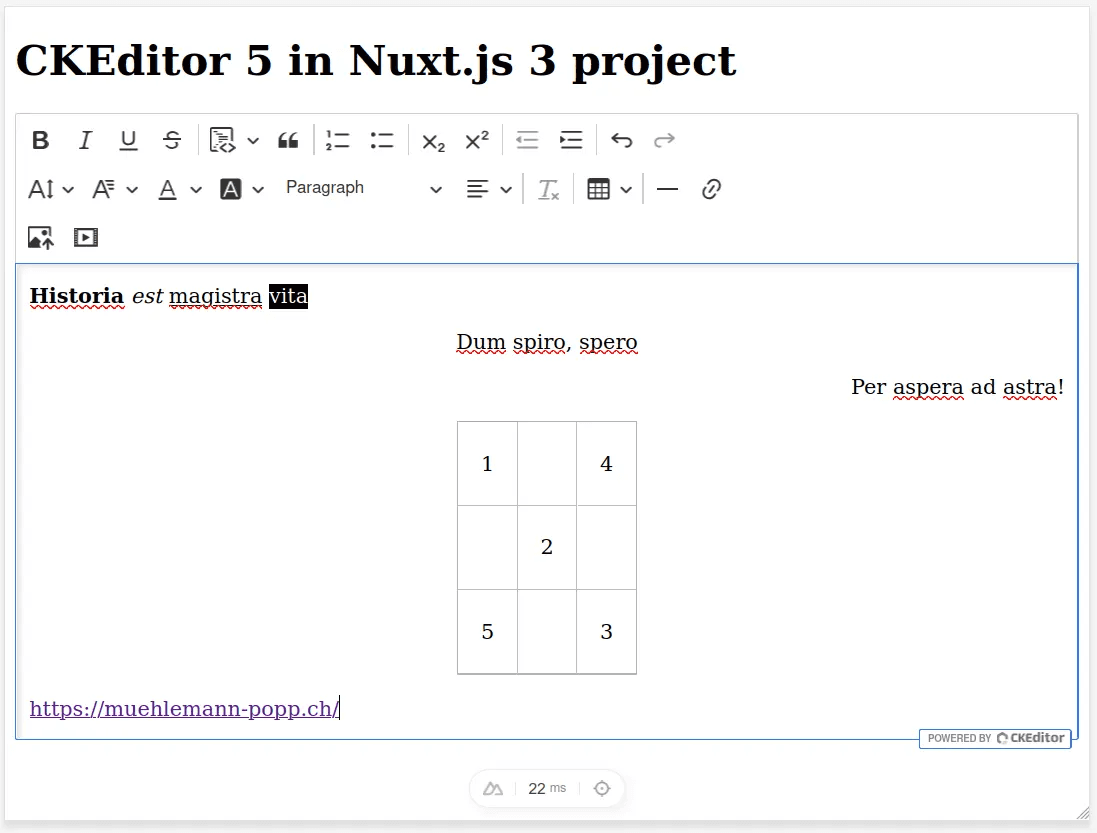
Nach der Verbindung der Plugins wird der Editor folgendermaßen aussehen:
Zusätzliche CKEditor-Konfigurationen
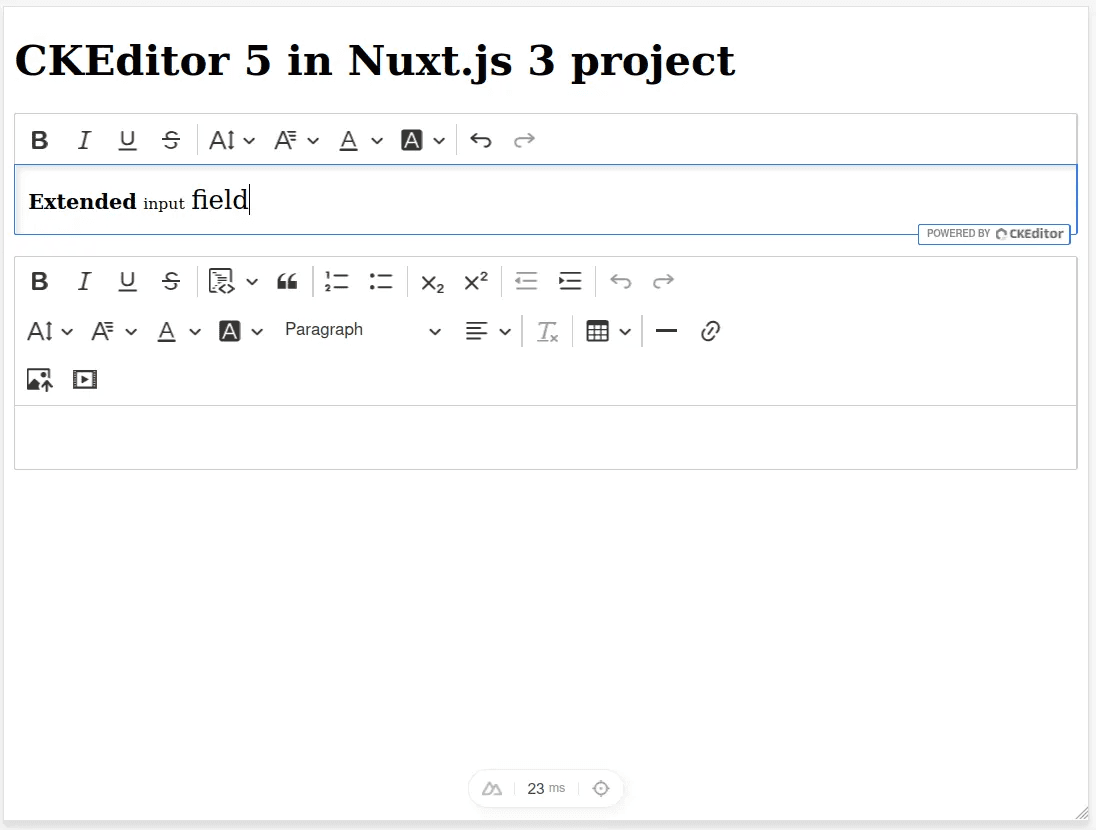
Zusätzlich zur Haupteditor-Konfiguration ist es auch möglich, so viele zusätzliche Konfigurationen zu erstellen, wie Sie möchten. Warum ist das notwendig? Zum Beispiel, um die Funktionalität für bestimmte Benutzer einzuschränken oder ein zusätzliches Feld zu implementieren, das einen begrenzten Funktionsumfang enthalten wird (zum Beispiel formatierte Überschriften).
Lassen Sie uns die Konfigurationsdatei `utils/custom-editor.ts` mit einer neuen Konfiguration für das erweiterte Eingabefeld ergänzen:
import { Alignment, Autoformat, BlockQuote, Bold, CKBox, ClassicEditor, CloudServices, CodeBlock, Essentials, Font, Heading, HorizontalLine, Image, ImageCaption, ImageResize, ImageStyle, ImageToolbar, ImageUpload, Indent, IndentBlock, Italic, Link, List, MediaEmbed, MediaEmbedEditing, MediaEmbedToolbar, MediaEmbedUI, Paragraph, PasteFromOffice, PictureEditing, RemoveFormat, Strikethrough, Subscript, Superscript, Table, TableCaption, TableCellProperties, TableColumnResize, TableProperties, TableToolbar, TextTransformation, Underline} from 'ckeditor5';import type { EditorConfig } from '@ckeditor/ckeditor5-core';// You can read more about extending the build with additional plugins in the "Installing plugins" guide.// See https://ckeditor.com/docs/ckeditor5/latest/installation/plugins/installing-plugins.html for details.import 'ckeditor5/ckeditor5.css';const predefinedColors = [ // Old one, predefined "out of the box" { color: 'rgb(0, 0, 0)', label: 'Black' }, { color: 'rgb(77, 77, 77)', label: 'Dim grey' }, { color: 'rgb(153, 153, 153)', label: 'Grey' }, { color: 'rgb(230, 230, 230)', label: 'Light grey' }, { color: 'rgb(255, 255, 255)', label: 'White', hasBorder: true }, { color: 'rgb(230, 76, 76)', label: 'Red' }, { color: 'rgb(230, 153, 76)', label: 'Orange' }, { color: 'rgb(230, 230, 76)', label: 'Yellow' }, { color: 'rgb(153, 230, 76)', label: 'Light green' }, { color: 'rgb(76, 230, 76)', label: 'Green' }, { color: 'rgb(76, 230, 153)', label: 'Aquamarine' }, { color: 'rgb(76, 230, 230)', label: 'Turquoise' }, { color: 'rgb(76, 153, 230)', label: 'Light blue' }, { color: 'rgb(76, 76, 230)', label: 'Blue' }, { color: 'rgb(153, 76, 230)', label: 'Purple' }, // New one, requested in STA-1714 { color: 'rgb(49, 55, 81)', label: 'Grey' }, { color: 'rgb(250, 162, 64)', label: 'Orange' }];class Editor extends ClassicEditor { public static override builtinPlugins = [ Autoformat, Alignment, BlockQuote, Bold, CKBox, CloudServices, CodeBlock, Essentials, Font, Heading, HorizontalLine, Image, ImageCaption, ImageResize, ImageStyle, ImageToolbar, ImageUpload, Indent, IndentBlock, Italic, Link, List, MediaEmbed, MediaEmbedEditing, MediaEmbedToolbar, MediaEmbedUI, Paragraph, PasteFromOffice, PictureEditing, RemoveFormat, Strikethrough, Subscript, Superscript, Table, TableCaption, TableCellProperties, TableColumnResize, TableProperties, TableToolbar, TextTransformation, Underline ]; public static override defaultConfig: EditorConfig = { toolbar: { items: [ 'bold', 'italic', 'underline', 'strikethrough', '|', 'codeBlock', 'blockQuote', '|', 'numberedList', 'bulletedList', '|', 'subscript', 'superscript', '|', 'outdent', 'indent', '|', 'undo', 'redo', '-', 'fontSize', 'fontFamily', 'fontColor', 'fontBackgroundColor', 'heading', 'alignment', '|', 'removeFormat', '|', 'insertTable', '|', 'horizontalLine', 'link', '-', 'imageUpload', 'mediaEmbed', ], shouldNotGroupWhenFull: true }, image: { toolbar: [ 'imageTextAlternative', 'toggleImageCaption', 'imageStyle:inline', 'imageStyle:block', 'imageStyle:side' ] }, table: { contentToolbar: ['tableColumn', 'tableRow', 'mergeTableCells', 'tableCellProperties', 'tableProperties'] }, fontSize: { options: [10, 12, 14, 'default', 16, 20, 24, 36] }, fontFamily: { options: [ 'default', 'Arial, sans-serif', 'Courier New, Courier Prime, monospace', 'Comic Sans, Comic Neue, sans-serif', 'Georgia, sans-serif', 'Lucida Sans, sans-serif', 'Open Sans Light, sans-serif', 'Open Sans, sans-serif', 'Open Sans Semibold, sans-serif', 'Tahoma, Catamaran, sans-serif', 'Times New Roman, Source Serif Pro, serif', 'Trebuchet MS, Helvetica, sans-serif', 'Verdana, sans-serif' ], supportAllValues: true }, heading: { options: [ { model: 'paragraph', title: 'Paragraph', class: 'ck-heading_paragraph' }, { model: 'heading1', view: 'h1', title: 'Heading 1', class: 'ck-heading_heading1' }, { model: 'heading2', view: 'h2', title: 'Heading 2', class: 'ck-heading_heading2' }, { model: 'heading3', view: 'h3', title: 'Heading 3', class: 'ck-heading_heading3' }, { model: 'heading4', view: 'h4', title: 'Heading 4', class: 'ck-heading_heading4' } ] }, indentBlock: { offset: 1, unit: 'em' }, fontColor: { colors: predefinedColors }, fontBackgroundColor: { colors: predefinedColors } };}class ExtendedInputField extends ClassicEditor { public static override builtinPlugins = [ Bold, Essentials, Font, Italic, Paragraph, Strikethrough, Subscript, Superscript, Underline ]; public static override defaultConfig: EditorConfig = { toolbar: { items: [ 'bold', 'italic', 'underline', 'strikethrough', '|', 'fontSize', 'fontFamily', 'fontColor', 'fontBackgroundColor', '|', 'undo', 'redo' ], shouldNotGroupWhenFull: true }, fontSize: { options: [10, 12, 14, 'default', 16, 20, 24, 36] }, fontFamily: { options: [ 'default', 'Arial, sans-serif', 'Courier New, Courier Prime, monospace', 'Comic Sans, Comic Neue, sans-serif', 'Georgia, sans-serif', 'Lucida Sans, sans-serif', 'Open Sans Light, sans-serif', 'Open Sans, sans-serif', 'Open Sans Semibold, sans-serif', 'Tahoma, Catamaran, sans-serif', 'Times New Roman, Source Serif Pro, serif', 'Trebuchet MS, Helvetica, sans-serif', 'Verdana, sans-serif' ], supportAllValues: true }, fontColor: { colors: predefinedColors }, fontBackgroundColor: { colors: predefinedColors } };}export { Editor, ExtendedInputField };
import { Alignment, Autoformat, BlockQuote, Bold, CKBox, ClassicEditor, CloudServices, CodeBlock, Essentials, Font, Heading, HorizontalLine, Image, ImageCaption, ImageResize, ImageStyle, ImageToolbar, ImageUpload, Indent, IndentBlock, Italic, Link, List, MediaEmbed, MediaEmbedEditing, MediaEmbedToolbar, MediaEmbedUI, Paragraph, PasteFromOffice, PictureEditing, RemoveFormat, Strikethrough, Subscript, Superscript, Table, TableCaption, TableCellProperties, TableColumnResize, TableProperties, TableToolbar, TextTransformation, Underline} from 'ckeditor5';import type { EditorConfig } from '@ckeditor/ckeditor5-core';// You can read more about extending the build with additional plugins in the "Installing plugins" guide.// See https://ckeditor.com/docs/ckeditor5/latest/installation/plugins/installing-plugins.html for details.import 'ckeditor5/ckeditor5.css';const predefinedColors = [ // Old one, predefined "out of the box" { color: 'rgb(0, 0, 0)', label: 'Black' }, { color: 'rgb(77, 77, 77)', label: 'Dim grey' }, { color: 'rgb(153, 153, 153)', label: 'Grey' }, { color: 'rgb(230, 230, 230)', label: 'Light grey' }, { color: 'rgb(255, 255, 255)', label: 'White', hasBorder: true }, { color: 'rgb(230, 76, 76)', label: 'Red' }, { color: 'rgb(230, 153, 76)', label: 'Orange' }, { color: 'rgb(230, 230, 76)', label: 'Yellow' }, { color: 'rgb(153, 230, 76)', label: 'Light green' }, { color: 'rgb(76, 230, 76)', label: 'Green' }, { color: 'rgb(76, 230, 153)', label: 'Aquamarine' }, { color: 'rgb(76, 230, 230)', label: 'Turquoise' }, { color: 'rgb(76, 153, 230)', label: 'Light blue' }, { color: 'rgb(76, 76, 230)', label: 'Blue' }, { color: 'rgb(153, 76, 230)', label: 'Purple' }, // New one, requested in STA-1714 { color: 'rgb(49, 55, 81)', label: 'Grey' }, { color: 'rgb(250, 162, 64)', label: 'Orange' }];class Editor extends ClassicEditor { public static override builtinPlugins = [ Autoformat, Alignment, BlockQuote, Bold, CKBox, CloudServices, CodeBlock, Essentials, Font, Heading, HorizontalLine, Image, ImageCaption, ImageResize, ImageStyle, ImageToolbar, ImageUpload, Indent, IndentBlock, Italic, Link, List, MediaEmbed, MediaEmbedEditing, MediaEmbedToolbar, MediaEmbedUI, Paragraph, PasteFromOffice, PictureEditing, RemoveFormat, Strikethrough, Subscript, Superscript, Table, TableCaption, TableCellProperties, TableColumnResize, TableProperties, TableToolbar, TextTransformation, Underline ]; public static override defaultConfig: EditorConfig = { toolbar: { items: [ 'bold', 'italic', 'underline', 'strikethrough', '|', 'codeBlock', 'blockQuote', '|', 'numberedList', 'bulletedList', '|', 'subscript', 'superscript', '|', 'outdent', 'indent', '|', 'undo', 'redo', '-', 'fontSize', 'fontFamily', 'fontColor', 'fontBackgroundColor', 'heading', 'alignment', '|', 'removeFormat', '|', 'insertTable', '|', 'horizontalLine', 'link', '-', 'imageUpload', 'mediaEmbed', ], shouldNotGroupWhenFull: true }, image: { toolbar: [ 'imageTextAlternative', 'toggleImageCaption', 'imageStyle:inline', 'imageStyle:block', 'imageStyle:side' ] }, table: { contentToolbar: ['tableColumn', 'tableRow', 'mergeTableCells', 'tableCellProperties', 'tableProperties'] }, fontSize: { options: [10, 12, 14, 'default', 16, 20, 24, 36] }, fontFamily: { options: [ 'default', 'Arial, sans-serif', 'Courier New, Courier Prime, monospace', 'Comic Sans, Comic Neue, sans-serif', 'Georgia, sans-serif', 'Lucida Sans, sans-serif', 'Open Sans Light, sans-serif', 'Open Sans, sans-serif', 'Open Sans Semibold, sans-serif', 'Tahoma, Catamaran, sans-serif', 'Times New Roman, Source Serif Pro, serif', 'Trebuchet MS, Helvetica, sans-serif', 'Verdana, sans-serif' ], supportAllValues: true }, heading: { options: [ { model: 'paragraph', title: 'Paragraph', class: 'ck-heading_paragraph' }, { model: 'heading1', view: 'h1', title: 'Heading 1', class: 'ck-heading_heading1' }, { model: 'heading2', view: 'h2', title: 'Heading 2', class: 'ck-heading_heading2' }, { model: 'heading3', view: 'h3', title: 'Heading 3', class: 'ck-heading_heading3' }, { model: 'heading4', view: 'h4', title: 'Heading 4', class: 'ck-heading_heading4' } ] }, indentBlock: { offset: 1, unit: 'em' }, fontColor: { colors: predefinedColors }, fontBackgroundColor: { colors: predefinedColors } };}class ExtendedInputField extends ClassicEditor { public static override builtinPlugins = [ Bold, Essentials, Font, Italic, Paragraph, Strikethrough, Subscript, Superscript, Underline ]; public static override defaultConfig: EditorConfig = { toolbar: { items: [ 'bold', 'italic', 'underline', 'strikethrough', '|', 'fontSize', 'fontFamily', 'fontColor', 'fontBackgroundColor', '|', 'undo', 'redo' ], shouldNotGroupWhenFull: true }, fontSize: { options: [10, 12, 14, 'default', 16, 20, 24, 36] }, fontFamily: { options: [ 'default', 'Arial, sans-serif', 'Courier New, Courier Prime, monospace', 'Comic Sans, Comic Neue, sans-serif', 'Georgia, sans-serif', 'Lucida Sans, sans-serif', 'Open Sans Light, sans-serif', 'Open Sans, sans-serif', 'Open Sans Semibold, sans-serif', 'Tahoma, Catamaran, sans-serif', 'Times New Roman, Source Serif Pro, serif', 'Trebuchet MS, Helvetica, sans-serif', 'Verdana, sans-serif' ], supportAllValues: true }, fontColor: { colors: predefinedColors }, fontBackgroundColor: { colors: predefinedColors } };}export { Editor, ExtendedInputField };
import { Alignment, Autoformat, BlockQuote, Bold, CKBox, ClassicEditor, CloudServices, CodeBlock, Essentials, Font, Heading, HorizontalLine, Image, ImageCaption, ImageResize, ImageStyle, ImageToolbar, ImageUpload, Indent, IndentBlock, Italic, Link, List, MediaEmbed, MediaEmbedEditing, MediaEmbedToolbar, MediaEmbedUI, Paragraph, PasteFromOffice, PictureEditing, RemoveFormat, Strikethrough, Subscript, Superscript, Table, TableCaption, TableCellProperties, TableColumnResize, TableProperties, TableToolbar, TextTransformation, Underline} from 'ckeditor5';import type { EditorConfig } from '@ckeditor/ckeditor5-core';// You can read more about extending the build with additional plugins in the "Installing plugins" guide.// See https://ckeditor.com/docs/ckeditor5/latest/installation/plugins/installing-plugins.html for details.import 'ckeditor5/ckeditor5.css';const predefinedColors = [ // Old one, predefined "out of the box" { color: 'rgb(0, 0, 0)', label: 'Black' }, { color: 'rgb(77, 77, 77)', label: 'Dim grey' }, { color: 'rgb(153, 153, 153)', label: 'Grey' }, { color: 'rgb(230, 230, 230)', label: 'Light grey' }, { color: 'rgb(255, 255, 255)', label: 'White', hasBorder: true }, { color: 'rgb(230, 76, 76)', label: 'Red' }, { color: 'rgb(230, 153, 76)', label: 'Orange' }, { color: 'rgb(230, 230, 76)', label: 'Yellow' }, { color: 'rgb(153, 230, 76)', label: 'Light green' }, { color: 'rgb(76, 230, 76)', label: 'Green' }, { color: 'rgb(76, 230, 153)', label: 'Aquamarine' }, { color: 'rgb(76, 230, 230)', label: 'Turquoise' }, { color: 'rgb(76, 153, 230)', label: 'Light blue' }, { color: 'rgb(76, 76, 230)', label: 'Blue' }, { color: 'rgb(153, 76, 230)', label: 'Purple' }, // New one, requested in STA-1714 { color: 'rgb(49, 55, 81)', label: 'Grey' }, { color: 'rgb(250, 162, 64)', label: 'Orange' }];class Editor extends ClassicEditor { public static override builtinPlugins = [ Autoformat, Alignment, BlockQuote, Bold, CKBox, CloudServices, CodeBlock, Essentials, Font, Heading, HorizontalLine, Image, ImageCaption, ImageResize, ImageStyle, ImageToolbar, ImageUpload, Indent, IndentBlock, Italic, Link, List, MediaEmbed, MediaEmbedEditing, MediaEmbedToolbar, MediaEmbedUI, Paragraph, PasteFromOffice, PictureEditing, RemoveFormat, Strikethrough, Subscript, Superscript, Table, TableCaption, TableCellProperties, TableColumnResize, TableProperties, TableToolbar, TextTransformation, Underline ]; public static override defaultConfig: EditorConfig = { toolbar: { items: [ 'bold', 'italic', 'underline', 'strikethrough', '|', 'codeBlock', 'blockQuote', '|', 'numberedList', 'bulletedList', '|', 'subscript', 'superscript', '|', 'outdent', 'indent', '|', 'undo', 'redo', '-', 'fontSize', 'fontFamily', 'fontColor', 'fontBackgroundColor', 'heading', 'alignment', '|', 'removeFormat', '|', 'insertTable', '|', 'horizontalLine', 'link', '-', 'imageUpload', 'mediaEmbed', ], shouldNotGroupWhenFull: true }, image: { toolbar: [ 'imageTextAlternative', 'toggleImageCaption', 'imageStyle:inline', 'imageStyle:block', 'imageStyle:side' ] }, table: { contentToolbar: ['tableColumn', 'tableRow', 'mergeTableCells', 'tableCellProperties', 'tableProperties'] }, fontSize: { options: [10, 12, 14, 'default', 16, 20, 24, 36] }, fontFamily: { options: [ 'default', 'Arial, sans-serif', 'Courier New, Courier Prime, monospace', 'Comic Sans, Comic Neue, sans-serif', 'Georgia, sans-serif', 'Lucida Sans, sans-serif', 'Open Sans Light, sans-serif', 'Open Sans, sans-serif', 'Open Sans Semibold, sans-serif', 'Tahoma, Catamaran, sans-serif', 'Times New Roman, Source Serif Pro, serif', 'Trebuchet MS, Helvetica, sans-serif', 'Verdana, sans-serif' ], supportAllValues: true }, heading: { options: [ { model: 'paragraph', title: 'Paragraph', class: 'ck-heading_paragraph' }, { model: 'heading1', view: 'h1', title: 'Heading 1', class: 'ck-heading_heading1' }, { model: 'heading2', view: 'h2', title: 'Heading 2', class: 'ck-heading_heading2' }, { model: 'heading3', view: 'h3', title: 'Heading 3', class: 'ck-heading_heading3' }, { model: 'heading4', view: 'h4', title: 'Heading 4', class: 'ck-heading_heading4' } ] }, indentBlock: { offset: 1, unit: 'em' }, fontColor: { colors: predefinedColors }, fontBackgroundColor: { colors: predefinedColors } };}class ExtendedInputField extends ClassicEditor { public static override builtinPlugins = [ Bold, Essentials, Font, Italic, Paragraph, Strikethrough, Subscript, Superscript, Underline ]; public static override defaultConfig: EditorConfig = { toolbar: { items: [ 'bold', 'italic', 'underline', 'strikethrough', '|', 'fontSize', 'fontFamily', 'fontColor', 'fontBackgroundColor', '|', 'undo', 'redo' ], shouldNotGroupWhenFull: true }, fontSize: { options: [10, 12, 14, 'default', 16, 20, 24, 36] }, fontFamily: { options: [ 'default', 'Arial, sans-serif', 'Courier New, Courier Prime, monospace', 'Comic Sans, Comic Neue, sans-serif', 'Georgia, sans-serif', 'Lucida Sans, sans-serif', 'Open Sans Light, sans-serif', 'Open Sans, sans-serif', 'Open Sans Semibold, sans-serif', 'Tahoma, Catamaran, sans-serif', 'Times New Roman, Source Serif Pro, serif', 'Trebuchet MS, Helvetica, sans-serif', 'Verdana, sans-serif' ], supportAllValues: true }, fontColor: { colors: predefinedColors }, fontBackgroundColor: { colors: predefinedColors } };}export { Editor, ExtendedInputField };
import { Alignment, Autoformat, BlockQuote, Bold, CKBox, ClassicEditor, CloudServices, CodeBlock, Essentials, Font, Heading, HorizontalLine, Image, ImageCaption, ImageResize, ImageStyle, ImageToolbar, ImageUpload, Indent, IndentBlock, Italic, Link, List, MediaEmbed, MediaEmbedEditing, MediaEmbedToolbar, MediaEmbedUI, Paragraph, PasteFromOffice, PictureEditing, RemoveFormat, Strikethrough, Subscript, Superscript, Table, TableCaption, TableCellProperties, TableColumnResize, TableProperties, TableToolbar, TextTransformation, Underline} from 'ckeditor5';import type { EditorConfig } from '@ckeditor/ckeditor5-core';// You can read more about extending the build with additional plugins in the "Installing plugins" guide.// See https://ckeditor.com/docs/ckeditor5/latest/installation/plugins/installing-plugins.html for details.import 'ckeditor5/ckeditor5.css';const predefinedColors = [ // Old one, predefined "out of the box" { color: 'rgb(0, 0, 0)', label: 'Black' }, { color: 'rgb(77, 77, 77)', label: 'Dim grey' }, { color: 'rgb(153, 153, 153)', label: 'Grey' }, { color: 'rgb(230, 230, 230)', label: 'Light grey' }, { color: 'rgb(255, 255, 255)', label: 'White', hasBorder: true }, { color: 'rgb(230, 76, 76)', label: 'Red' }, { color: 'rgb(230, 153, 76)', label: 'Orange' }, { color: 'rgb(230, 230, 76)', label: 'Yellow' }, { color: 'rgb(153, 230, 76)', label: 'Light green' }, { color: 'rgb(76, 230, 76)', label: 'Green' }, { color: 'rgb(76, 230, 153)', label: 'Aquamarine' }, { color: 'rgb(76, 230, 230)', label: 'Turquoise' }, { color: 'rgb(76, 153, 230)', label: 'Light blue' }, { color: 'rgb(76, 76, 230)', label: 'Blue' }, { color: 'rgb(153, 76, 230)', label: 'Purple' }, // New one, requested in STA-1714 { color: 'rgb(49, 55, 81)', label: 'Grey' }, { color: 'rgb(250, 162, 64)', label: 'Orange' }];class Editor extends ClassicEditor { public static override builtinPlugins = [ Autoformat, Alignment, BlockQuote, Bold, CKBox, CloudServices, CodeBlock, Essentials, Font, Heading, HorizontalLine, Image, ImageCaption, ImageResize, ImageStyle, ImageToolbar, ImageUpload, Indent, IndentBlock, Italic, Link, List, MediaEmbed, MediaEmbedEditing, MediaEmbedToolbar, MediaEmbedUI, Paragraph, PasteFromOffice, PictureEditing, RemoveFormat, Strikethrough, Subscript, Superscript, Table, TableCaption, TableCellProperties, TableColumnResize, TableProperties, TableToolbar, TextTransformation, Underline ]; public static override defaultConfig: EditorConfig = { toolbar: { items: [ 'bold', 'italic', 'underline', 'strikethrough', '|', 'codeBlock', 'blockQuote', '|', 'numberedList', 'bulletedList', '|', 'subscript', 'superscript', '|', 'outdent', 'indent', '|', 'undo', 'redo', '-', 'fontSize', 'fontFamily', 'fontColor', 'fontBackgroundColor', 'heading', 'alignment', '|', 'removeFormat', '|', 'insertTable', '|', 'horizontalLine', 'link', '-', 'imageUpload', 'mediaEmbed', ], shouldNotGroupWhenFull: true }, image: { toolbar: [ 'imageTextAlternative', 'toggleImageCaption', 'imageStyle:inline', 'imageStyle:block', 'imageStyle:side' ] }, table: { contentToolbar: ['tableColumn', 'tableRow', 'mergeTableCells', 'tableCellProperties', 'tableProperties'] }, fontSize: { options: [10, 12, 14, 'default', 16, 20, 24, 36] }, fontFamily: { options: [ 'default', 'Arial, sans-serif', 'Courier New, Courier Prime, monospace', 'Comic Sans, Comic Neue, sans-serif', 'Georgia, sans-serif', 'Lucida Sans, sans-serif', 'Open Sans Light, sans-serif', 'Open Sans, sans-serif', 'Open Sans Semibold, sans-serif', 'Tahoma, Catamaran, sans-serif', 'Times New Roman, Source Serif Pro, serif', 'Trebuchet MS, Helvetica, sans-serif', 'Verdana, sans-serif' ], supportAllValues: true }, heading: { options: [ { model: 'paragraph', title: 'Paragraph', class: 'ck-heading_paragraph' }, { model: 'heading1', view: 'h1', title: 'Heading 1', class: 'ck-heading_heading1' }, { model: 'heading2', view: 'h2', title: 'Heading 2', class: 'ck-heading_heading2' }, { model: 'heading3', view: 'h3', title: 'Heading 3', class: 'ck-heading_heading3' }, { model: 'heading4', view: 'h4', title: 'Heading 4', class: 'ck-heading_heading4' } ] }, indentBlock: { offset: 1, unit: 'em' }, fontColor: { colors: predefinedColors }, fontBackgroundColor: { colors: predefinedColors } };}class ExtendedInputField extends ClassicEditor { public static override builtinPlugins = [ Bold, Essentials, Font, Italic, Paragraph, Strikethrough, Subscript, Superscript, Underline ]; public static override defaultConfig: EditorConfig = { toolbar: { items: [ 'bold', 'italic', 'underline', 'strikethrough', '|', 'fontSize', 'fontFamily', 'fontColor', 'fontBackgroundColor', '|', 'undo', 'redo' ], shouldNotGroupWhenFull: true }, fontSize: { options: [10, 12, 14, 'default', 16, 20, 24, 36] }, fontFamily: { options: [ 'default', 'Arial, sans-serif', 'Courier New, Courier Prime, monospace', 'Comic Sans, Comic Neue, sans-serif', 'Georgia, sans-serif', 'Lucida Sans, sans-serif', 'Open Sans Light, sans-serif', 'Open Sans, sans-serif', 'Open Sans Semibold, sans-serif', 'Tahoma, Catamaran, sans-serif', 'Times New Roman, Source Serif Pro, serif', 'Trebuchet MS, Helvetica, sans-serif', 'Verdana, sans-serif' ], supportAllValues: true }, fontColor: { colors: predefinedColors }, fontBackgroundColor: { colors: predefinedColors } };}export { Editor, ExtendedInputField };
Erweiterung des Projektplugins `plugins/ckeditor.ts` mit einer neuen Editor-Konfiguration:
import Ckeditor from "@ckeditor/ckeditor5-vue";// import ClassicEditor from "@ckeditor/ckeditor5-build-classic";import { Editor, ExtendedInputField } from "~/utils/custom-editor";export default defineNuxtPlugin((nuxtApp) => { nuxtApp.vueApp.use(Ckeditor); return { provide: { ckeditor: { // classicEditor: ClassicEditor, customEditor: Editor, extendedInputField: ExtendedInputField }, }, };});
import Ckeditor from "@ckeditor/ckeditor5-vue";// import ClassicEditor from "@ckeditor/ckeditor5-build-classic";import { Editor, ExtendedInputField } from "~/utils/custom-editor";export default defineNuxtPlugin((nuxtApp) => { nuxtApp.vueApp.use(Ckeditor); return { provide: { ckeditor: { // classicEditor: ClassicEditor, customEditor: Editor, extendedInputField: ExtendedInputField }, }, };});
import Ckeditor from "@ckeditor/ckeditor5-vue";// import ClassicEditor from "@ckeditor/ckeditor5-build-classic";import { Editor, ExtendedInputField } from "~/utils/custom-editor";export default defineNuxtPlugin((nuxtApp) => { nuxtApp.vueApp.use(Ckeditor); return { provide: { ckeditor: { // classicEditor: ClassicEditor, customEditor: Editor, extendedInputField: ExtendedInputField }, }, };});
import Ckeditor from "@ckeditor/ckeditor5-vue";// import ClassicEditor from "@ckeditor/ckeditor5-build-classic";import { Editor, ExtendedInputField } from "~/utils/custom-editor";export default defineNuxtPlugin((nuxtApp) => { nuxtApp.vueApp.use(Ckeditor); return { provide: { ckeditor: { // classicEditor: ClassicEditor, customEditor: Editor, extendedInputField: ExtendedInputField }, }, };});
Lassen Sie uns eine neue Wrapper-Komponente für das neue Feld erstellen:
touch ./components/extended-input-field.vue
touch ./components/extended-input-field.vue
touch ./components/extended-input-field.vue
touch ./components/extended-input-field.vue
Als nächstes füllen wir die Komponente `components/extended-input-field.vue` aus:
<template> <ckeditor :editor="extendedInputField" /></template><script setup>const { $ckeditor } = useNuxtApp();const extendedInputField = $ckeditor.extendedInputField;</script
<template> <ckeditor :editor="extendedInputField" /></template><script setup>const { $ckeditor } = useNuxtApp();const extendedInputField = $ckeditor.extendedInputField;</script
<template> <ckeditor :editor="extendedInputField" /></template><script setup>const { $ckeditor } = useNuxtApp();const extendedInputField = $ckeditor.extendedInputField;</script
<template> <ckeditor :editor="extendedInputField" /></template><script setup>const { $ckeditor } = useNuxtApp();const extendedInputField = $ckeditor.extendedInputField;</script
Fügen Sie eine neue Komponente zur Seite in `pages/index.vue` hinzu:
<template> <h1>CKEditor 5 in Nuxt.js 3 project</h1> <p> <extended-input-field /> </p> <p> <rich-editor /> </p></template><script setup></script
<template> <h1>CKEditor 5 in Nuxt.js 3 project</h1> <p> <extended-input-field /> </p> <p> <rich-editor /> </p></template><script setup></script
<template> <h1>CKEditor 5 in Nuxt.js 3 project</h1> <p> <extended-input-field /> </p> <p> <rich-editor /> </p></template><script setup></script
<template> <h1>CKEditor 5 in Nuxt.js 3 project</h1> <p> <extended-input-field /> </p> <p> <rich-editor /> </p></template><script setup></script
Überprüfen wir das Ergebnis:
npm run dev
npm run dev
npm run dev
npm run dev
Fazit
Die Integration von CKEditor 5 in ein Nuxt.js 3-Projekt eröffnet leistungsstarke Funktionen zur Bearbeitung von Rich Text für Ihre Anwendung. Indem Sie die Schritt-für-Schritt-Anleitung in diesem Artikel befolgt haben, haben Sie gelernt, wie Sie:
Ein grundlegendes Nuxt.js 3-Projekt einrichten
CKEditor 5 installieren und konfigurieren
Ein benutzerdefiniertes Build mit spezifischen Plugins und Funktionen erstellen
Mehrere Editor-Konfigurationen für verschiedene Anwendungsfälle implementieren
Die Flexibilität von CKEditor 5 ermöglicht es Ihnen, den Editor an Ihre spezifischen Bedürfnisse anzupassen, von einem voll ausgestatteten Rich-Text-Editor bis hin zu einem eingeschränkten Eingabefeld. Diese Anpassung stellt sicher, dass Sie das richtige Bearbeitungserlebnis für Ihre Benutzer bieten können, egal, ob sie komplexe Formatierungsoptionen oder eine einfachere Schnittstelle benötigen.
Einige wichtige Erkenntnisse:
Stellen Sie immer sicher, dass die Plugin-Versionen mit Ihrer CKEditor-Core-Version übereinstimmen
Nutzen Sie das Plugin-System, um Funktionen nach Bedarf hinzuzufügen oder zu entfernen
Erstellen Sie mehrere Editor-Konfigurationen, um verschiedenen Teilen Ihrer Anwendung gerecht zu werden
Achten Sie auf die Konfiguration der Symbolleiste, um ein reibungsloses Benutzererlebnis zu bieten
Während Sie weiterhin Ihre Nuxt.js-Anwendung entwickeln, können Sie Ihre CKEditor-Implementierung weiter verfeinern. Ziehen Sie in Betracht, erweiterte Funktionen wie benutzerdefinierte Plugins, kollaborative Bearbeitung oder Integration mit Ihrem Backend für Bild-Uploads und Inhaltsverwaltung zu erkunden.
Denken Sie daran, dass die CKEditor-Dokumentation eine unschätzbare Ressource für die Fehlersuche und das Entdecken neuer Funktionen ist. Während sowohl Nuxt.js als auch CKEditor weiterentwickelt werden, bleiben Sie über die neuesten Versionen und Best Practices informiert, um sicherzustellen, dass Ihre Lösung zur Bearbeitung von Rich Text robust und effizient bleibt.
Durch das Meistern der Integration von CKEditor 5 in Ihr Nuxt.js 3-Projekt haben Sie ein leistungsstarkes Werkzeug zu Ihrem Webentwicklungs-Toolkit hinzugefügt, das die Erstellung von Inhalten in Ihrer Anwendung verbessert.
by
Andrey Kalashnikov
Senior Python Entwickler
by
Andrey Kalashnikov
Senior Python Entwickler
veröffentlicht
teilen